A real union
The output is the visible outline and nothing else. One <path>, no overlapping subpaths, so font engines and vector editors have nothing to trip over.
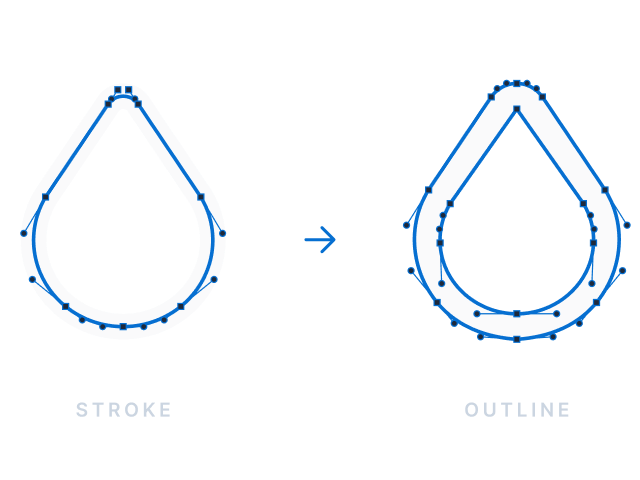
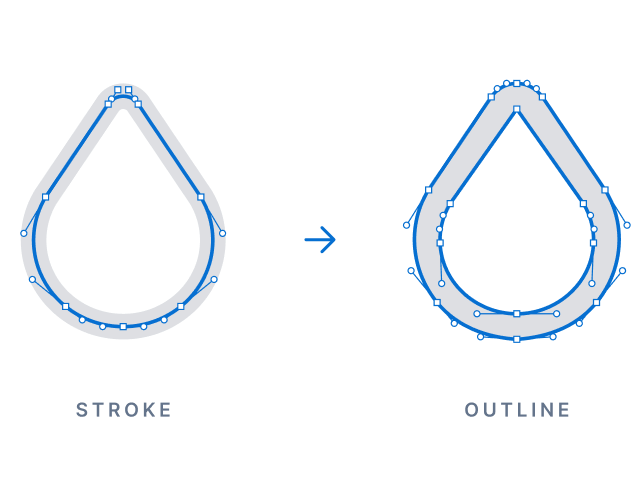
Every stroke becomes a filled shape, the overlaps are merged with a real boolean union, and the whole icon comes out as one path with nothing overlapping itself.
This is armchair, a 24 px icon from the test set. It goes in as 4 stroked shapes and comes out as one filled <path> of 1300 bytes, or 1091 after SVGO. The conversion took 15.7 ms.
<svg
  xmlns="http://www.w3.org/2000/svg"
  width="24"
  height="24"
  viewBox="0 0 24 24"
  fill="none"
  stroke="currentColor"
  stroke-width="2"
  stroke-linecap="round"
  stroke-linejoin="round"
>
  <path d="M5 11a2 2 0 0 1 2 2v2h10v-2a2 2 0 1 1 4 0v4a2 2 0 0 1 -2 2h-14a2 2 0 0 1 -2 -2v-4a2 2 0 0 1 2 -2" />
  <path d="M5 11v-5a3 3 0 0 1 3 -3h8a3 3 0 0 1 3 3v5" />
  <path d="M6 19v2" />
  <path d="M18 19v2" />
</svg><svg xmlns="http://www.w3.org/2000/svg" width="24" height="24" viewBox="0 0 24 24" fill="currentColor">
<path d="M20 10.174C21.226 10.676 21.96 11.66 22 13V17C21.947 18.763 20.724 19.896 19 20C19 20.352 19.096 21.102 18.866 21.5C18.43 22.255 17.26 22.10 …"/>
</svg> A stroke gets covered with small polygons, one per segment, one per join and one per cap. Most converters stop right there and let the renderer's fill rule hide the overlaps. unstroke merges them into the actual outline before it writes anything out.
npm install unstrokepnpm add unstrokeyarn add unstrokeYou can convert a folder from the command line or a string from code. Both take the same options.
npx unstroke icons/ -o outlined/                 # a whole folder, tree mirrored
npx unstroke icons/ -o thin/ --stroke-width 1.5  # every weight from one source
npx unstroke icons/ -o out/ --optimize # plus SVGOimport { outlineSvg, outlinePathData } from 'unstroke';
const filled = outlineSvg(svgSource); // whole document
const thin = outlineSvg(svgSource, { strokeWidth: 1.5 }); // override the width
const d = outlinePathData('M3 13h4', { strokeWidth: 2, linecap: 'round' });The getting started guide walks through both.
We ran 203 icons from a production icon set through every stroke-to-outline engine we could script, passed each result through the same SVGO step, and rasterized it against the original.
| engine | avg bytes | mean pixel mismatch | wrong / failed |
|---|---|---|---|
| unstroke | 1061 | 0.000% | 0 |
| Skia PathOps (CanvasKit) | 1721 | 0.000% | 0 |
| Paper.js booleans | 1610 | 0.000% | 0 |
| FontForge | 589 | 0.244% | 17 |
FontForge wins on size only because it's imprecise. Skia and Paper.js are accurate on this sample, but they keep every fragment their intersections produce. On the full set of 5130 icons, both curve-based engines silently break icons that unstroke handles. The full comparison and the reasoning behind polygons go into the details.
Icon fonts, first of all. Glyphs have no concept of a stroke, and font engines either reject overlapping contours or render them wrong. unstroke gives you one clean set of contours per icon.
PDF export, plotters and laser cutters. These treat every path as a fill, or they need the actual outline to cut along.
Design tools that don't support strokes. Some import paths but ignore stroke-width, and some render strokes differently than a browser does.
And one source for several weights. You keep the icons as strokes and generate the 1 px, 1.5 px and 2 px variants at build time with --stroke-width.
unstroke is free to use and its development is funded by sponsors. If it saves you time, consider becoming a sponsor on GitHub or donating on PayPal.